
No doubt you are all very excited to get started with Autopilot Device Prep and all of the lovely new features it gives you!
But, what if your devices are already enrolled into Autopilot? As you may have noticed, if the hash is registered, autopilot wins.
After speaking to my good friend, Jóhannes Geir Kristjánsson, he suggested the idea of a script which can migrate devices for you and here it is!
As usual I’ve also added it to the PowerShell Gallery:
Install-Script -Name migrate-autopilot-device
The script will grab the device details, checks if the Corporate Device Identifier exists. If it doesn’t detect it, the identifier is created. Finally (optionally), it deletes the autopilot object.
It can be run interactively, or with parameters and as with my other scripts, supports app registration.
If running interactively, you’ll get a box with all of your AP devices, select whichever ones you want to migrate and then on the popup, confirm if you want the devices to be deleted.
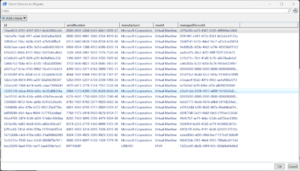
For running on a console, use the -serial parameter to add the serial numbers (comma separated) of devices to be migrated and the -delete ($true or $false) parameter.
Just querying the use of Device Prep versus Autopilot. As with Device Prep it uses serial numbers which are easily spoofed, whereas Autopilot uses hardware hashes which is a lot more difficult to spoof. We work in a business where we have high cyber security requirements.
Was just wondering what your take on this is?
If they do manage to guess a serial added in your tenant, they still need credentials to enrol a device so your CA policies should protect the same as logging into M365 apps